Contact Linking
To plug the holes that are generally left after SSO integrations take place, OneBasket has it's own contact linking mechanisms in place to ensure that the customer's identity can be unified across all provider system APIs.
This makes it possible for OneBasket to make purchases on behalf of a single customer across multiple services.
OneBasket refers to it's own internal representation of a customer as a Contact, and we then refer to the external system representations that are linked to our representation as a provider contact.
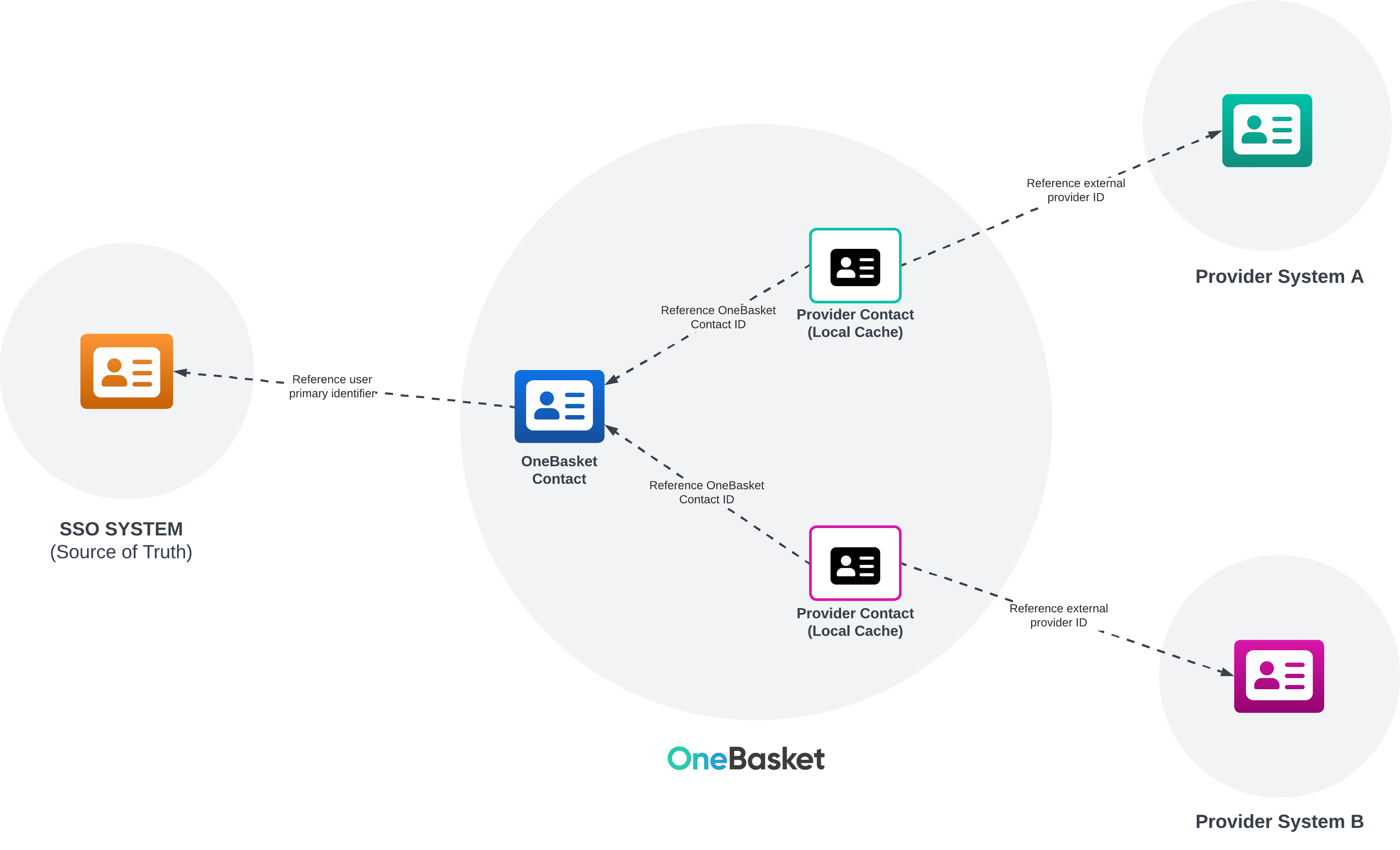
OneBasket's contact linking system isn't limited to just product providers. Contacts can be linked with other systems such as Customer Experience Platforms, Customer Data Platforms, Data Warehouses and more, enabling data about customers to be ingested by OneBasket as well as be sent into other tooling of your overall solution.
Linking Challenges
One of the challenges with linking contact representations between disparate systems is having the link in place when you need it.
For example, if a customer is signed in, and they are purchasing tickets, then during the purchase process, OneBasket needs to be able to map from the SSO ID into the ticketing system id in order to send the right customer id to the ticketing system and complete the purchase. If you don't have that link already, then there is no way for OneBasket to know which user in the exteral system to attribute the sale to.
In the case of product eligibilities, it's necessary for OneBasket to have linked and cached some data about the contact ahead of time. For example, if you want to show a given user what ticketing events they are eligible to purchase for (for example, being in a sales window to purchase tickets to a football match), then specific features of that contact need to be cached into OneBasket so that eligibilities can be shown quickly.
In some cases, it's feasible that contact eligibility could be attained directly from the provider system in real time, however rate limiting generally becomes a barrier with this approach, especially in high throughput sales workflows such as ticketing.
Strategies
Unfortunately, there's no single solution to solve these problems, other than for all systems involved in the ecosystem, both internal and external, to support the same SSO ID through their APIs. As we saw previously, this not generally possible.
Therefore, OneBasket employs various strategies that compliment each other.
Bulk import
With a bulk import, all existing users are imported into OneBasket. A static data set is provided with each current user, containing their SSO ID, and their equivalent IDs in all relevant external provider systems. This is then imported into OneBasket and the links are created in OneBasket's contact services, and the different provider integration services.
This hower doesn't account for new users being created, or updates in different systems needing to be reflected in OneBasket. Thus, bulk import is just one strategy of a few that can be used to create a comprehensive linking strategy.
SSO System Linking
OneBasket comes out of the box with webhooks that allow external SSO systems to notify it of when new users are created.
For SSO systems that already support contact linking (which is a big plus), OneBasket is also able to have the SSO system effectively coordinate the linking system in OneBasket, so that there is a 1:1 representation of a given user's links between all systems involved.
Provider Updates
Provider integration services in OneBasket (i.e the internal services that talk between OneBasket and external provider systems), can be built to allow external systems to push contact updates into OneBasket, for example, to keep purchasing eligibilities up to date.
Handling new users
As we've emphasised, linking contacts and keeping cached data fresh is not as simple as it would appear at first glance. The above approaches work well to mitigate the issues, however these only help when you are working with users that have already been created in the ecosystem.
What if you have a prospective customer that is completely new to your ecosystem wanting to make a purchase, but to do so they need to exist in multiple systems?
Or, what if you have an existing customer that only exists in a few systems, and they want to purchase products from a different provider system that also requires a representation of the contact to complete the purchase?
In the case of the former, one way might be to force the user through an SSO sign up process that creates the user in the SSO system, and the goes through all potential provider systems (or maybe just the one in question) and creates them in advance. True that could work, but means that for huge user bases, you can end up with millions of customer records in systems that they would never really need to be in. For example, high profile football clubs have millions and millions of followers, but generally less than 100k ticket buyers in any given year. You don't want to fill your ticketing system up with millions of unecessary users.
In the case of the latter, the new user will need to be created on the fly as part of the checkout process, and OneBasket is able to handle this for you.